Reactive MCP: Live Diagnosis for Reactive Contracts

Today we're releasing Reactive MCP, a server that lets your AI agent answer questions from live chain data. Point Claude, Cursor, VS Code, or ChatGPT at https://mcp.rnk.dev/mcp, paste a contract address, and ask why it didn't react. The agent pulls subscriptions, balances, and the transaction trail, then comes back with a verdict and a fix.
It works in the other direction too. Describe what you want to automate, and the agent can plan the contract, start from a template that compiles, and check your code before you deploy.
Short Version for Newcomers
A reactive contract (RC) is a smart contract that watches other chains for events and responds on its own, often by sending a callback to a contract on another chain. MCP (Model Context Protocol) is an open standard that lets AI assistants call outside tools, a bit like a USB port for agents.
Reactive MCP plugs Reactive Network into that port. Your assistant can now help you write an RC, look up what it's doing once it's live, and explain both in plain language.
Many Hops, Multiple Suspects
An RC reaction is a relay race with six legs, and a dropped baton on any of them looks the same from outside: nothing happened.
- The origin chain emits an event.
- The RC's subscription filter matches it.
- The sequencer picks it up.
- Reactive Network runs the RC's
react()in a reactive transaction. - The RC requests a callback.
- The callback proxy delivers it on the destination chain.
Each leg has its own failure modes. A topic0 hashed from uint instead of uint256 never matches. An RC in debt stops reacting until it's topped up. A callback recipient that owes the destination's callback proxy simply never gets called.
Until now, sorting this out meant juggling Reactscan, explorers on two chains, and system contract events. How much of that detective work really needed a human?
Fourteen Tools, One Endpoint
Reactive MCP ships fourteen tools in two groups: nine for diagnosing contracts and five for writing them. You never have to call them by name. The agent picks them based on what you ask.
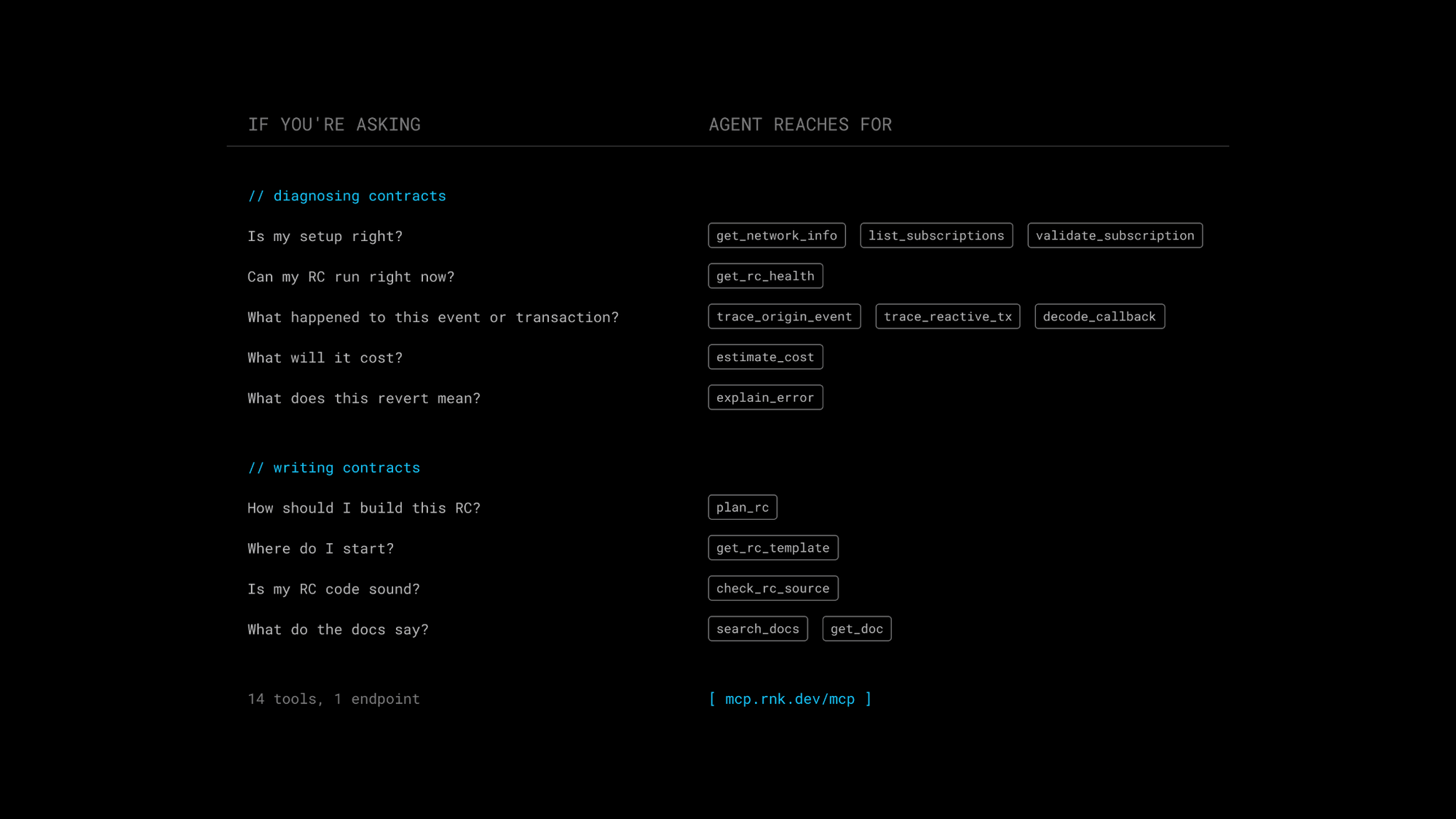
We expect validate_subscription to save the most hours. It checks subscribe() criteria before or after deployment, catching the uint vs. uint256 mismatch, zero topics used as wildcards instead of REACTIVE_IGNORE, and mainnet/testnet mixing.
Behind the tools sit reference resources (common pitfalls, error codes, system events, supported networks, our docs pages, and two contract templates) plus three packaged prompts. diagnose_rc walks health, then subscriptions, then the trace. create_rc packages the writing flow. review_rc_source runs check_rc_source first, then reviews your code against a list of common mistakes.
Verdicts Over Vibes
Agents sound confident by default, which is risky when the answer concerns funds sitting in a contract. So every Reactive MCP report ends with a verdict, such as LOW_RESERVES or DEST_IN_DEBT, and says how sure it is: proven, likely, or cannot_prove. It also shows the on-chain evidence behind the call, suggests a fix, and flags what it couldn't see.
You might ask why callbacks to Ethereum Sepolia have stopped. The agent chains list_subscriptions, get_rc_health, and trace_reactive_tx, and finds the RC reacting just fine. The callback recipient owes debt at the Ethereum Sepolia callback proxy, so deliveries stall there.
Writing Contracts
Debugging is half the story. Ask for a new RC, and the agent typically plans it with plan_rc, pulls a starting point with get_rc_template, fills in your logic, and runs check_rc_source on the result.
Templates come as a standalone reactive contract or as a pair, and they compile as they are, with TODOs marking where your own logic goes. When the agent needs an answer from the docs, search_docs and get_doc read a copy of our docs bundled with the server, so it quotes the documentation instead of guessing from memory. None of the writing tools touch a chain, so you can draft before you've funded anything.
Plug In
The endpoint is public and needs no authentication. In Claude Code, one command does it:
claude mcp add --transport http reactive-mcp https://mcp.rnk.dev/mcp
Cursor and VS Code take the same URL in their MCP config files, and claude.ai and ChatGPT accept it as a custom connector. The Reactive MCP page in our docs has snippets for each.
Queries default to Lasna testnet. To check the mainnet, just say so in your question, as in "check 0x… on the mainnet", and the agent passes it along.
Closing Thought
Reactive MCP never asks for private keys and never sends transactions. The deploy commands it suggests use a Foundry keystore account (--account), so you run them yourself and your key stays in your keystore. The worst it can do is be wrong, which is why diagnoses come with confidence levels and why generated code still deserves a read before it goes on-chain. It's also an early release. This is v0.1, and tool names and report formats will change as we learn how people use them.
A lot of RC bugs come down to the same handful of mistakes: a wrong topic, an empty balance, a debt on the far side of a callback. If an agent can avoid those while writing and catch them while debugging, humans get to spend their time on the interesting problems. Try it on your own contract, or on one you haven't written yet, and tell us what it gets wrong. And once the agent can handle both ends, which part of building on Reactive becomes the interesting one?
About Reactive Network
Reactive Network is an EVM automation layer built around reactive contracts — event-driven smart contracts for cross-chain execution. It runs on CometBFT consensus, providing deterministic finality with roughly one-second block times while maintaining full EVM compatibility. Reactive contracts subscribe to event logs across EVM chains and execute Solidity logic automatically when matching events occur, issuing cross-chain callback transactions when their conditions are met.
Website | Blog | X | Telegram | Discord | Docs
Build once — react everywhere!